
EPT USB Blaster

 JTAG Blaster II
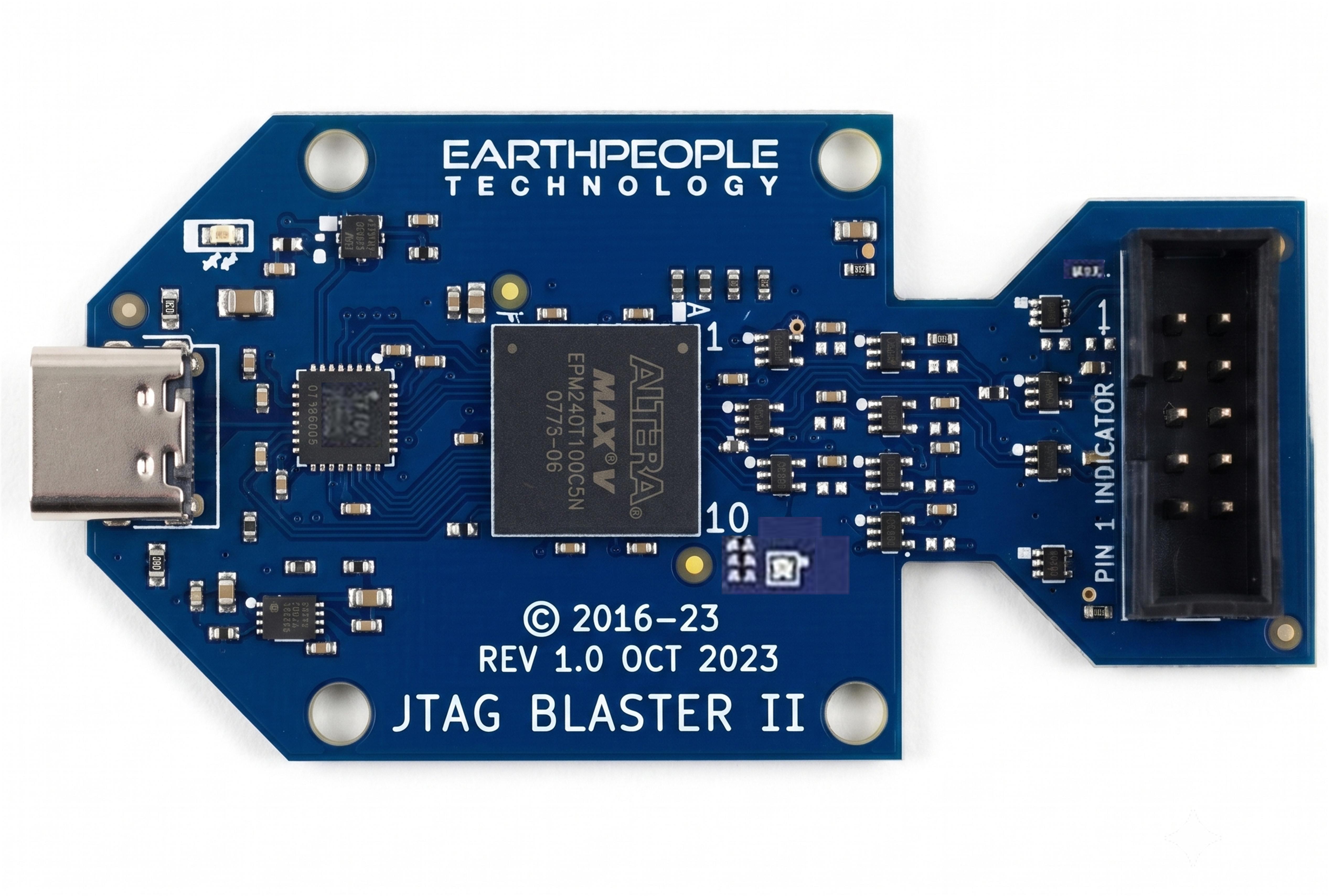
JTAG Blaster II Provides JTAG connectivity for Altera FPGAs, CPLDs and Flash devices only |
|
The JTAG Blaster II is a USB Based Programmer Adapter specifically designed to program Altera’s FPGA’s, CPLD’s and Flash chips. The board is a stand alone, USB powered device that can program Altera’s devices using +1.8V to +5.0V. It uses a USB-C cable to connect to the Host. And a 10 pin connector to connect to the device to program. |
Program CPLDs and FPGAs
|
The JTAG Blaster II is designed as a direct replacement for the original USB Blaster from Altera. The board programs Altera FPGA’s, CPLD’s and Flash chips at the default speed of 6MHz. It uses the driver included with the Quartus Software. So, there is no external software to install to get the JTAG Blaster II working. Just plug the USB-C cable into a laptop with Quartus and connect to the board. The Quartus Software will automatically recognize the JTAG Blaster II as a USB Blaster. |
Specifications
Features:
|
Supported Software:
|
Supported Devices:
|
JTAG Blaster Connection and Programming LEDs
|
The board includes a “CONNECT” LED. This LED will light Green once the board has been fully enumerated by the Host PC. Enumeration happens because the FT245 USB to Parallel chip has been properly powered by the on board supply and the Host PC recognizes the board and the Host PC has successfully loaded the appropriate driver for the board.
The JTAG Blaster II includes an RGB LED in the lower right corner
This LED will light up Blue when the programming is idle. When |


JTAG Connector
|
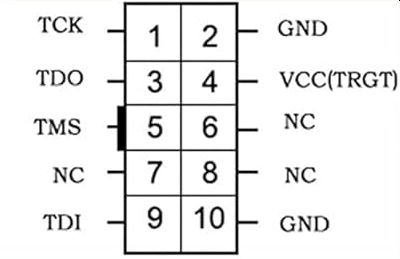
The JTAG Blaster includes a 5×2 Shrouded Male Header that comprises the JTAG Connector to connect to target device. Pin 1 located in the upper left corner.
The pinout of this connector is the standard Altera pinout.
Altera Standard PS Signals Pinout The JTAG Connector utilizes the standard pinout of the Altera USB Blaster.
In this case, we connect to the MaxProLogic using the 10 pin Ribbon cable. |



No Driver Needed
|
The JTAG Blaster II uses the Driver from the Quartus Prime Software. There is no external or third party driver needed. Just connect the JTAG Blaster to an available USB port on a PC with Quartus Installed
And the Quartus Prime Software will automatically recognize the JTAG |


Downloads
| 85-000012 | EPT JTAG Blaster II User Manual | EPT_JTAG_BLASTER_II_UM_V3.pdf |
| 95-000013 | EPT JTAG Blaster II Data Sheet | EPT_JTAG_BLASTER_II_DS_V2.pdf |
| 45-000013 | EPT JTAG Blaster II Project DVD | JTAG_BLASTER_II_PROJECT_1.0_DVD.zip |